정적 분석 도구 실전 가이드 - clang-tidy, cppcheck, SonarQube

Dev.Sol
시리즈 4부: 정적 분석 도구 실전 가이드
목차
1. 정적 분석이란
정적 분석(Static Analysis)은 프로그램을 실행하지 않고 소스 코드를 분석하여 버그, 보안 취약점, 코딩 표준 위반을 찾는 기법입니다.
장점:
- 컴파일 전에 문제 발견
- 실행 경로가 복잡한 버그도 탐지
- 코딩 표준 준수 자동 검증
단점:
- False Positive (오탐) 가능성
- 설정과 튜닝 필요
- 런타임 오류는 탐지 불가
2. 도구 비교
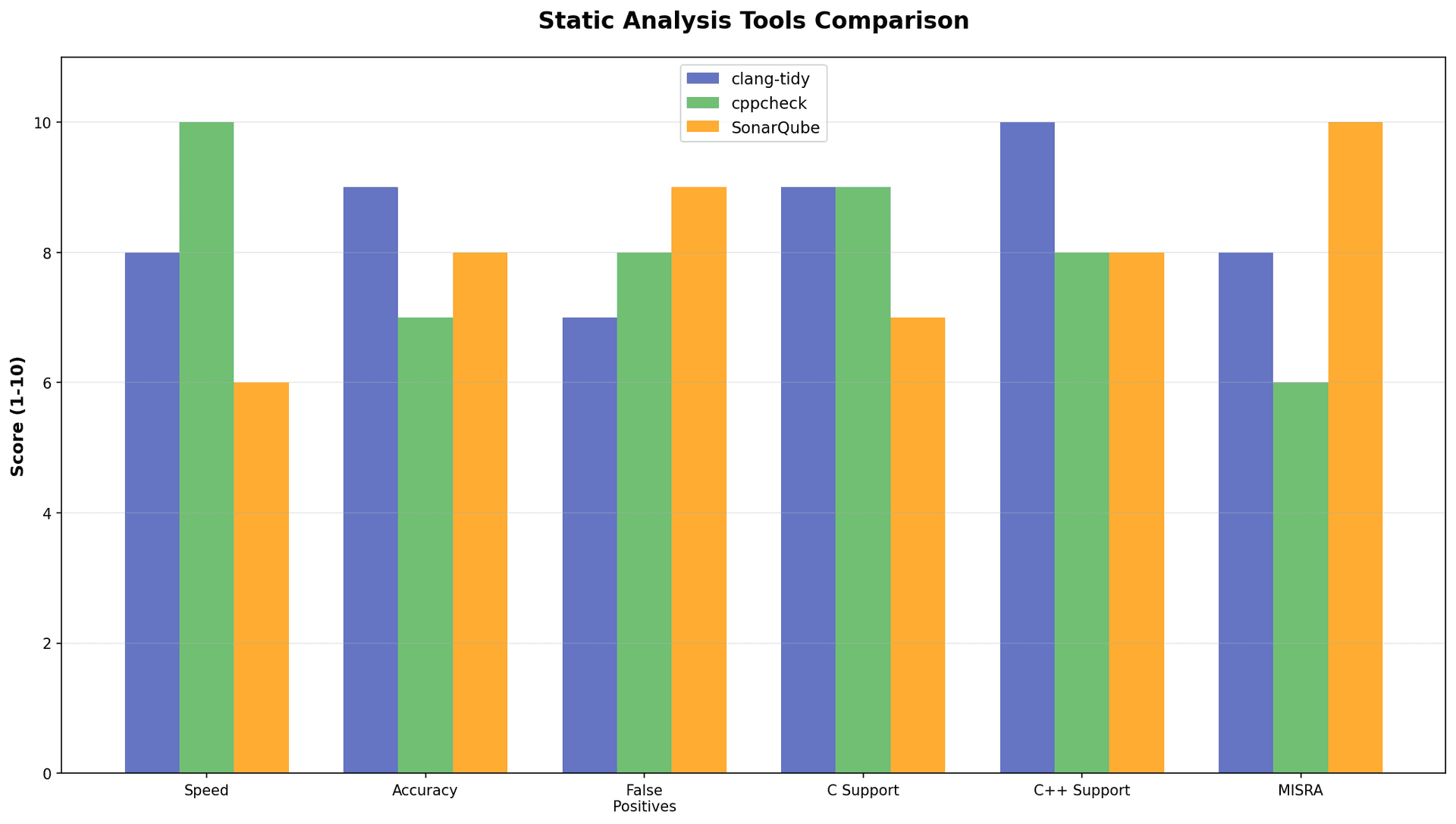
2.1 clang-tidy
개발: LLVM 프로젝트
언어: C, C++
라이선스: Apache 2.0 (오픈소스)
특징:
- clang 기반의 C++ linter
- 모듈형 구조 (check groups)
- CERT, C++ Core Guidelines 지원
- 자동 수정(fix-it) 기능
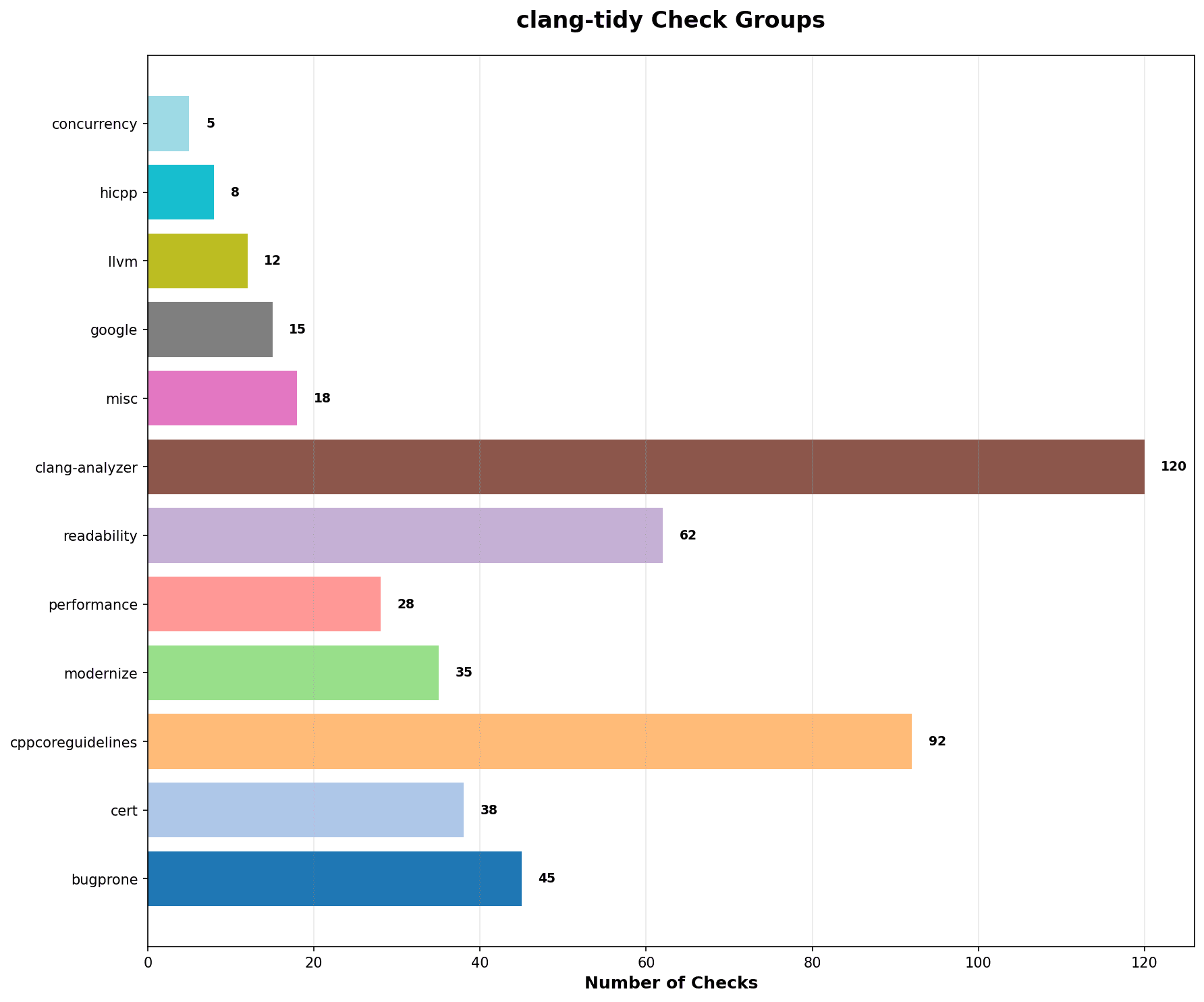
체크 그룹:
bugprone-: 버그 가능성 높은 코드cert-: CERT Secure Coding Guidelinescppcoreguidelines-: C++ Core Guidelinesmodernize-: C++11 이상 모던 C++ 권장performance-: 성능 이슈readability-: 가독성
출처: clang.llvm.org/extra/clang-tidy
2.2 cppcheck
개발: Cppcheck 프로젝트
언어: C, C++
라이선스: GPL 3.0 (오픈소스)
최신 버전: 2.19.0
특징:
- 빠른 분석 속도
- Undefined Behavior 탐지 중점
- 비표준 문법 지원 (임베디드 프로젝트에 유리)
- GUI 제공
- False Positive 최소화
탐지 항목:
- Dead pointers
- Division by zero
- Integer overflows
- Memory management
- Null pointer dereferences
- Out of bounds checking
- Uninitialized variables
2.3 SonarQube
개발: SonarSource
언어: 다중 언어 (C, C++, Java, Python 등)
라이선스: Community Edition (오픈소스) / Commercial
특징:
- 웹 대시보드
- 코드 품질 메트릭
- 기술 부채 측정
- MISRA-C 지원 (Commercial)
- 다중 언어 지원
3. clang-tidy 실전
3.1 설치
Ubuntu/Debian:
sudo apt-get install clang-tidyFedora:
sudo yum install clang-tools-extramacOS:
brew install llvm버전 확인:
clang-tidy --version3.2 기본 사용법
단일 파일 분석:
clang-tidy test.c -- -Iinclude모든 체크 나열:
clang-tidy -list-checks특정 체크 그룹 선택:
clang-tidy test.c -checks='-*,bugprone-*,cert-*'3.3 설정 파일 (.clang-tidy)
프로젝트 루트에 .clang-tidy 파일 생성:
---
Checks: '-*,
  bugprone-*,
  cert-*,
  cppcoreguidelines-*,
  modernize-*,
  performance-*,
  readability-*,
  -modernize-use-trailing-return-type'
WarningsAsErrors: ''
HeaderFilterRegex: ''
FormatStyle: none
체크 비활성화 예시:
-*: 모든 기본 체크 비활성화-modernize-use-trailing-return-type: 특정 체크만 비활성화
3.4 자동 수정
clang-tidy test.c -fix -checks='readability-braces-around-statements'주의: -fix 옵션은 파일을 직접 수정하므로 버전 관리 필요
3.5 compile_commands.json
CMake 프로젝트의 경우:
cmake -DCMAKE_EXPORT_COMPILE_COMMANDS=ON ..생성된 compile_commands.json을 프로젝트 루트에 복사:
cp build/compile_commands.json .이후 컴파일 옵션 없이 실행 가능:
clang-tidy src/*.c4. cppcheck 실전
4.1 설치
Ubuntu/Debian:
sudo apt-get install cppcheckFedora:
sudo yum install cppcheckmacOS:
brew install cppcheck버전 확인:
cppcheck --version
# Cppcheck 2.19
4.2 기본 사용법
단일 파일:
cppcheck test.c디렉터리 전체:
cppcheck src/모든 경고 활성화:
cppcheck --enable=all src/4.3 옵션
Include 경로 지정:
cppcheck -Iinclude -Ilib src/특정 경고만 활성화:
cppcheck --enable=warning,performance src/XML 출력 (CI 연동용):
cppcheck --xml --xml-version=2 src/ 2> cppcheck-result.xml4.4 억제(Suppression)
인라인 억제:
// cppcheck-suppress nullPointer
int *p = NULL;
*p = 10;
억제 파일 (suppressions.txt):
nullPointer:test.c:10
uninitvar
사용:
cppcheck --suppressions-list=suppressions.txt src/4.5 MISRA 체크 (Addon)
cppcheck --addon=misra src/MISRA 규칙 파일 (misra.txt) 필요:
Appendix A Summary of guidelines
Rule 1.1 Required
Rule 1.2 Advisory
...
5. SonarQube 실전
5.1 설치 (Docker)
docker run -d --name sonarqube -p 9000:9000 sonarqube:community브라우저에서 http://localhost:9000 접속
기본 계정: admin / admin
5.2 SonarScanner 설치
Linux:
wget https://binaries.sonarsource.com/Distribution/sonar-scanner-cli/sonar-scanner-cli-4.8.0.2856-linux.zip
unzip sonar-scanner-cli-4.8.0.2856-linux.zip
export PATH=$PATH:$PWD/sonar-scanner-4.8.0.2856-linux/bin
5.3 프로젝트 설정
프로젝트 루트에 sonar-project.properties 생성:
sonar.projectKey=my-project
sonar.projectName=My C Project
sonar.projectVersion=1.0
sonar.sources=src
sonar.language=c
sonar.sourceEncoding=UTF-8
5.4 분석 실행
sonar-scanner \
  -Dsonar.host.url=http://localhost:9000 \
  -Dsonar.login=YOUR_TOKEN
토큰 생성: SonarQube 웹 UI > My Account > Security > Generate Token
5.5 C/C++ 분석 (Build Wrapper)
Build Wrapper 다운로드:
wget http://localhost:9000/static/cpp/build-wrapper-linux-x86.zip
unzip build-wrapper-linux-x86.zip
빌드 캡처:
build-wrapper-linux-x86/build-wrapper-linux-x86-64 --out-dir bw-output make clean all분석:
sonar-scanner \
  -Dsonar.cfamily.build-wrapper-output=bw-output
6. CI/CD 통합
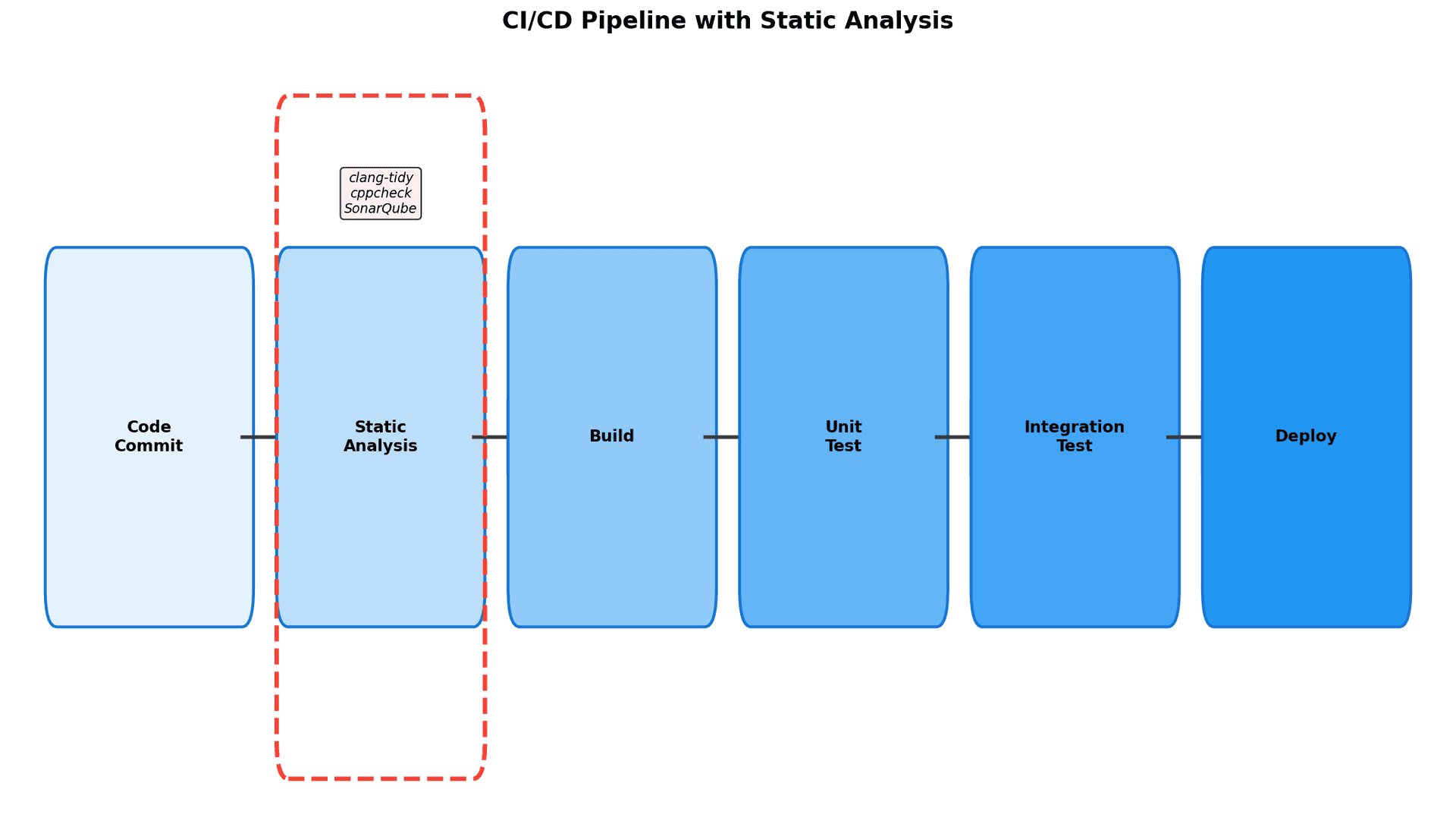
6.1 GitHub Actions 예시
.github/workflows/static-analysis.yml:
name: Static Analysis

on: [push, pull_request]

jobs:
  clang-tidy:
    runs-on: ubuntu-latest
    steps:
      - uses: actions/checkout@v3

      - name: Install clang-tidy
        run: sudo apt-get install -y clang-tidy

      - name: Run clang-tidy
        run: clang-tidy src/*.c -- -Iinclude

  cppcheck:
    runs-on: ubuntu-latest
    steps:
      - uses: actions/checkout@v3

      - name: Install cppcheck
        run: sudo apt-get install -y cppcheck

      - name: Run cppcheck
        run: cppcheck --enable=all --xml --xml-version=2 src/ 2> cppcheck-result.xml

      - name: Upload results
        uses: actions/upload-artifact@v3
        with:
          name: cppcheck-results
          path: cppcheck-result.xml
6.2 Pre-commit Hook
.git/hooks/pre-commit:
#!/bin/bash

echo "Running clang-tidy..."
clang-tidy --quiet $(git diff --cached --name-only --diff-filter=ACM | grep '\\.c$') -- -Iinclude

if [ $? -ne 0 ]; then
    echo "clang-tidy found issues. Aborting commit."
    exit 1
fi

echo "Running cppcheck..."
cppcheck --quiet --enable=warning $(git diff --cached --name-only --diff-filter=ACM | grep '\\.c$')

if [ $? -ne 0 ]; then
    echo "cppcheck found issues. Aborting commit."
    exit 1
fi

echo "Static analysis passed!"
exit 0
실행 권한 부여:
chmod +x .git/hooks/pre-commit6.3 CMake 통합
CMakeLists.txt:
# clang-tidy
find_program(CLANG_TIDY_EXE NAMES "clang-tidy")
if(CLANG_TIDY_EXE)
    set(CMAKE_C_CLANG_TIDY
        ${CLANG_TIDY_EXE};
        -checks=-*,bugprone-*,cert-*;
    )
endif()

# cppcheck
find_program(CPPCHECK_EXE NAMES "cppcheck")
if(CPPCHECK_EXE)
    set(CMAKE_C_CPPCHECK
        ${CPPCHECK_EXE};
        --enable=warning,performance;
        --inconclusive;
    )
endif()
7. 실전 팁
7.1 False Positive 처리
단계적 접근:
- 경고 내용 이해
- 실제 버그인지 확인
- 오탐이면 억제 추가
- 패턴이 반복되면 체크 비활성화
7.2 도구 조합
추천 조합:
- 개발 단계: clang-tidy (빠른 피드백)
- 커밋 전: cppcheck (빠른 전체 스캔)
- CI/CD: SonarQube (품질 대시보드)
7.3 점진적 도입
1단계: 심각한 버그만 탐지 (error, warning)
2단계: 성능 이슈 추가 (performance)
3단계: 가독성/스타일 추가 (readability, modernize)
7.4 성능 최적화
병렬 실행 (clang-tidy):
find src -name '*.c' | xargs -P$(nproc) -n1 clang-tidy증분 분석 (수정된 파일만):
git diff --name-only HEAD | grep '\\.c$' | xargs clang-tidy8. 다음 단계
이 시리즈에서 다룬 내용:
- 임베디드 C 코딩 표준 완벽 가이드
- BARR-C 완벽 가이드
- MISRA-C 심화 가이드
- 정적 분석 도구 실전 가이드 (이 글)
다음 학습 추천:
- 동적 분석 도구 (Valgrind, AddressSanitizer)
- 단위 테스트 프레임워크 (CUnit, Unity)
- 코드 커버리지 측정 (gcov, lcov)
참고 자료
시리즈 전체 목차:
- 임베디드 C 코딩 표준 완벽 가이드 (발행 완료)
- BARR-C 완벽 가이드 (발행 완료)
- MISRA-C 심화 가이드 (발행 완료)
- 정적 분석 도구 실전 가이드 (이 글)